THE SHORT VERSION
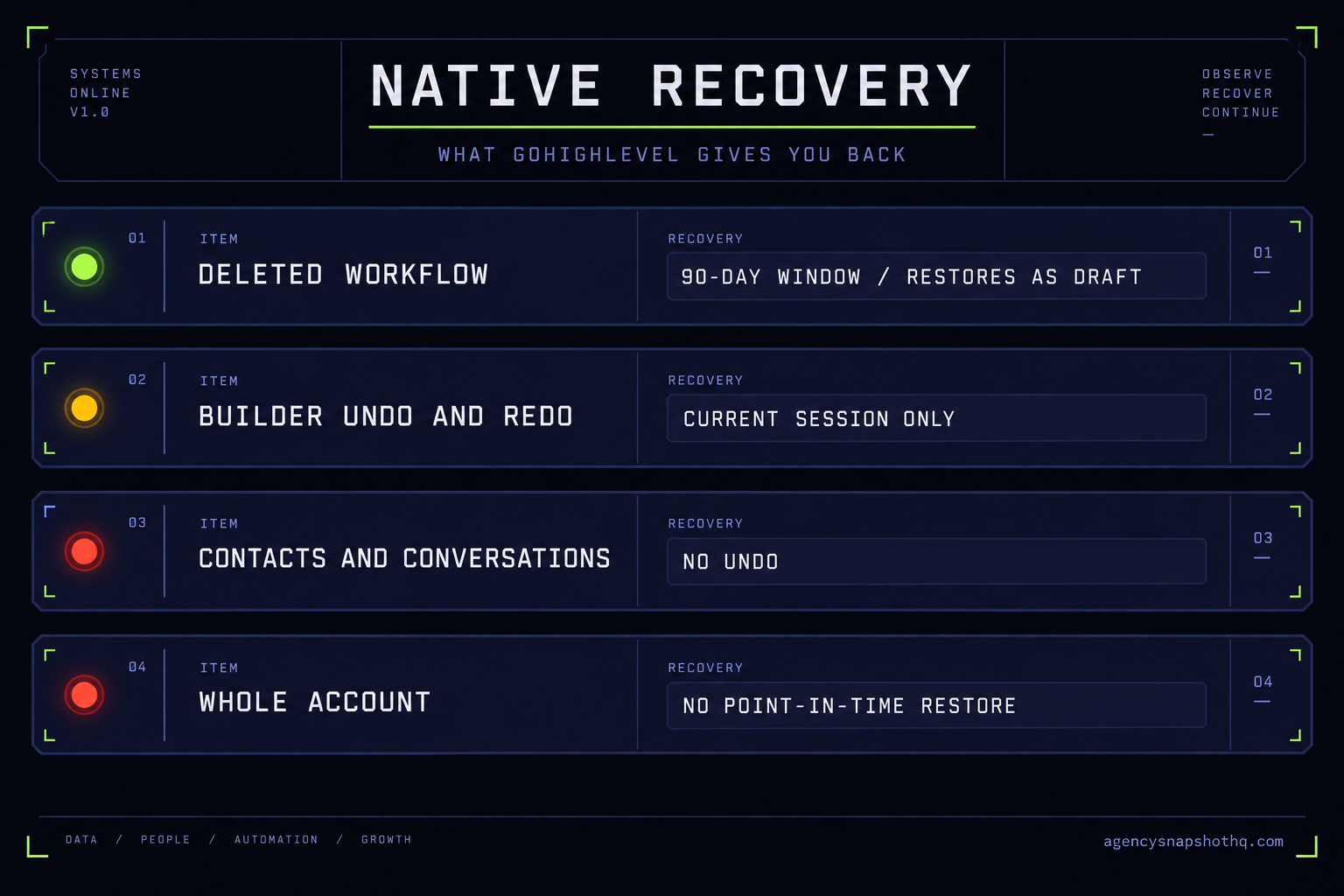
- GoHighLevel has no account-level point-in-time restore. The only native recovery is a 90-day Deleted tab for workflows and a session-only undo in the builder, and neither helps you after you have closed the tab or lost the login.
- A snapshot is a config backup, not a data backup. It carries your workflows, funnels and pipelines, and it carries none of your contacts, opportunities or conversation history.
- The four protection methods are a kept snapshot, a manual data export, a third-party export tool, and a master build you own with a written restore runbook. Each captures a different slice of the account.
- The method you can actually keep running beats the method that captures the most on paper, because an export you take once and never repeat is six weeks stale the day you need it.
- The cost of one lost build already clears the cost of protecting it, and the agency that owns the master recovers in an afternoon while the one that does not starts the account over.
The text comes in at 9.12 on a Tuesday. “Hey, are we still sending booking confirmations? Two clients told me they never got one.” You open the account, go to the automation list, and the confirmation workflow is not there. Not paused. Gone. You scroll twice to be sure. Somewhere between last Thursday and this morning, someone deleted it, and GoHighLevel did not ask twice and did not keep a copy where you can see one.
Your first instinct is to look for an undo. There isn’t one you can reach, not for this. There is no button that says “the account as it was on Thursday.” You start reconstructing the workflow from memory, and halfway through you realise you do not actually remember the exact wait step, or whether the confirmation fired on booking or on the day before. The client is still waiting. That is the whole problem with running on a platform that has no account-level restore: the moment you need the old version, there is no old version to go to.
This briefing is about making sure the next Tuesday ends differently. Not with a longer apology, but with a restore. You already run the account. What you are choosing here is how you hold a copy of it, and there are four honest ways to do that, each capturing a different slice of what you would need back.
What GoHighLevel actually lets you recover
Before you choose a protection method, be clear about what the platform gives you for free, because it is less than most operators assume and more than nothing.
Start with the one real safety net: the workflow Deleted tab. When a workflow is deleted, it does not vanish immediately. It drops into a Deleted tab inside Automation, where a Location or Agency Admin can restore it. The window is ninety days, after which it is removed for good, and there is a short delay before a just-deleted workflow becomes restorable, per GoHighLevel’s own help article. That is the good news. The catch is in the detail, and it is the detail that costs people a second outage: a restored workflow comes back as a draft, not published, and it lands at the root level rather than the folder it lived in. So you can get the workflow back and still have it sit there doing nothing, because nobody re-published it. The confirmation texts stay off until someone notices the draft.
Then there is the builder’s undo and redo. Inside a single workflow, while you are editing it, every auto-saved change can be reversed or replayed. This is genuinely useful for the “I just dragged the wrong action into the wrong branch” mistake. But it is session-based, as the help centre describes it: it reverses changes in the current session. Close the tab, come back tomorrow, and there is no durable history waiting to walk you back through last week’s edits. Undo protects the next thirty seconds, not the last thirty days.
That is close to the whole list of native recovery. There is no account-level point-in-time restore, no “roll the sub-account back to Friday,” no snapshot of the data taken on a schedule you can revert to. Bulk changes to contacts are the clearest example. If a VA runs a bulk action on the wrong filter and overwrites a custom field on four thousand records, or deletes a segment, there is no clean platform-level undo for that at the account level you can rely on the way you would rely on a database restore elsewhere. The audit log can tell you what happened and who did it, which matters for the conversation afterward, but knowing who overwrote the field does not put the field back.
So the native picture is narrow. One workflow at a time, inside a window, restored to a draft you have to re-publish. Everything wider than that, the whole build, the data, the settings, the history, is outside the platform’s reach once it is gone. That is not a knock on GoHighLevel. It is just the shape of the tool, and it is the shape your protection has to cover.
Why a snapshot is a config backup, not a data backup
The instinct of most operators, once they understand there is no account restore, is correct: pull a snapshot. A snapshot is the closest thing the platform has to a copy of a build, and pulling one of a live account into your agency library is a real and sensible protective move. But you have to know exactly what a snapshot holds, because the gap between what it holds and what you assumed it held is where the second disaster happens, at restore time, when it is too late to fix.
A snapshot carries the account’s configuration. The workflows and their logic, the pipelines and their stages, the funnels and websites, the forms and surveys, the calendars and appointment types, the custom fields, the custom values and tags, the email and SMS templates, the trigger links. The machine, in other words. A third-party snapshots guide, confirmed via search snippet rather than an official page I could reach, lays the division out the same way every operator eventually learns it by hand.
What a snapshot does not carry is the account’s data and its connections. No contacts. No opportunities sitting in the pipeline. No conversation history, no call logs, no sent messages. It does not carry the phone numbers or the A2P 10DLC registration, so a restored account has to clear registration again before it can text. It does not carry the Google, Facebook or Stripe connections, the connected staff calendars, the domain and DNS, the sending-domain authentication, the team members and their permissions, or the billing and wallet settings. All of that is set up fresh on whatever account you restore into.
Read that list against the Tuesday scenario and the shape of the problem gets sharper. If you had pulled a snapshot last week, you could restore the confirmation workflow in minutes, correct wait step and all, because the workflow is config and config is exactly what a snapshot keeps. But if the disaster had instead been a bulk contact wipe, the snapshot would restore you an empty, perfectly built machine with four thousand missing records. The build would be back. The business would not.
This is why a snapshot is half of a backup. It is the half most worth having, because the build is the part that took you weeks and the part you cannot reconstruct from memory. But a protection plan that stops at “I pull a snapshot sometimes” has quietly decided that the client’s contacts and conversations are expendable. Sometimes that is a fair call. It should at least be a call you made on purpose, not one you discover you made when the restore comes up empty.
The four ways to protect a build
Set against that reality, there are four methods agencies actually use. They are not mutually exclusive, and the strongest posture combines two of them. But it helps to see each one on its own first, because each draws its line in a different place.
A kept snapshot
You pull a fresh snapshot of each live account into your agency account on a schedule, and you keep the last few. This is free, it uses only the platform you already pay for, and it captures the entire build. Restoring means importing the snapshot into a clean or repaired sub-account and re-doing the account-specific setup the snapshot never carried. The weakness is the one from the section above: it is a config backup only, and it is only as fresh as the last time you remembered to pull it. If you snapshot monthly and the account breaks on the twenty-ninth day, you lose a month of build changes on top of all the data.
A manual data export
You export the data a snapshot misses. Contacts and opportunities export to CSV, and you write down the settings that do not export cleanly: which integrations were connected, which domain, which numbers. This is the half a kept snapshot leaves out, and together the two cover most of what you would want back. The weakness is that it is manual and partial. Conversation history and the inside of workflows do not come out in a tidy file, the export is a point in time that ages the moment you take it, and “I will export the contacts every Friday” is the routine that survives exactly three Fridays before a busy week kills it.
A third-party export tool
There is a small category of tools built to pull more out of a GoHighLevel account than the native exports do, on a schedule, so the copy stays current without you remembering. Used well, this closes the freshness gap that sinks manual exports. The weaknesses are that it is another subscription and another vendor with access to your clients’ data, that what it can and cannot capture varies and is worth testing against a real restore before you trust it, and that it still cannot magically recover things the platform does not expose. Treat any such tool as a claim to verify with a test restore, not a promise to take on faith.
A master you own, with a restore runbook
This is the agency version, and it is less a product than a discipline. You treat the canonical build as something you own and hold in a library you control, you version it deliberately so you always know which account is on which build, and you keep a short written runbook of exactly how to restore: which snapshot, into what, which account-specific steps to redo in which order. Pair that with a data export routine, or with the snapshot update service that keeps the master current for you, and you have both halves plus the one thing the other three methods lack, which is a tested, written path from “it broke” to “it is back.” The weakness is that it only works if you actually keep it up, which is the same weakness every backup plan has ever had.
The four methods on eight criteria
Here are the four side by side on the things that decide between them. Service prices are this site’s published prices, read live; your own time is yours to fill in.
| Criterion | Kept snapshot | Manual export | Third-party tool | Owned master + runbook |
|---|---|---|---|---|
| What it captures | The whole build, no data | Contacts and opportunities, no build | Varies; usually build plus more data | Build plus a data routine plus the restore path |
| Restore granularity | Whole build at once | Records only | Varies by tool | Whole build, and single items if you also hold a recent snapshot |
| Restore speed | Fast for config, once setup is redone | Fast for data, slow to rebuild settings | Depends on the tool and the restore type | Fastest overall, because the steps are written down |
| Recurring cost | Free with your plan | Free, costs your time | A monthly subscription | Your time, or a managed fee if you hand it over |
| Upkeep effort | Low, if the schedule holds | High and easy to abandon | Low once configured | Moderate and deliberate |
| Who can run it | Any admin | Any admin or VA | Whoever owns the tool | You, or a crew you brief with the runbook |
| Where it fails | Comes back with no contacts | Goes stale, misses conversations and workflow internals | Unverified capture, extra data exposure | Only if the discipline lapses |
| Best for | Every agency, as the baseline | Filling the data gap a snapshot leaves | Operators who will not keep a manual routine | Anyone running client accounts they cannot afford to lose |
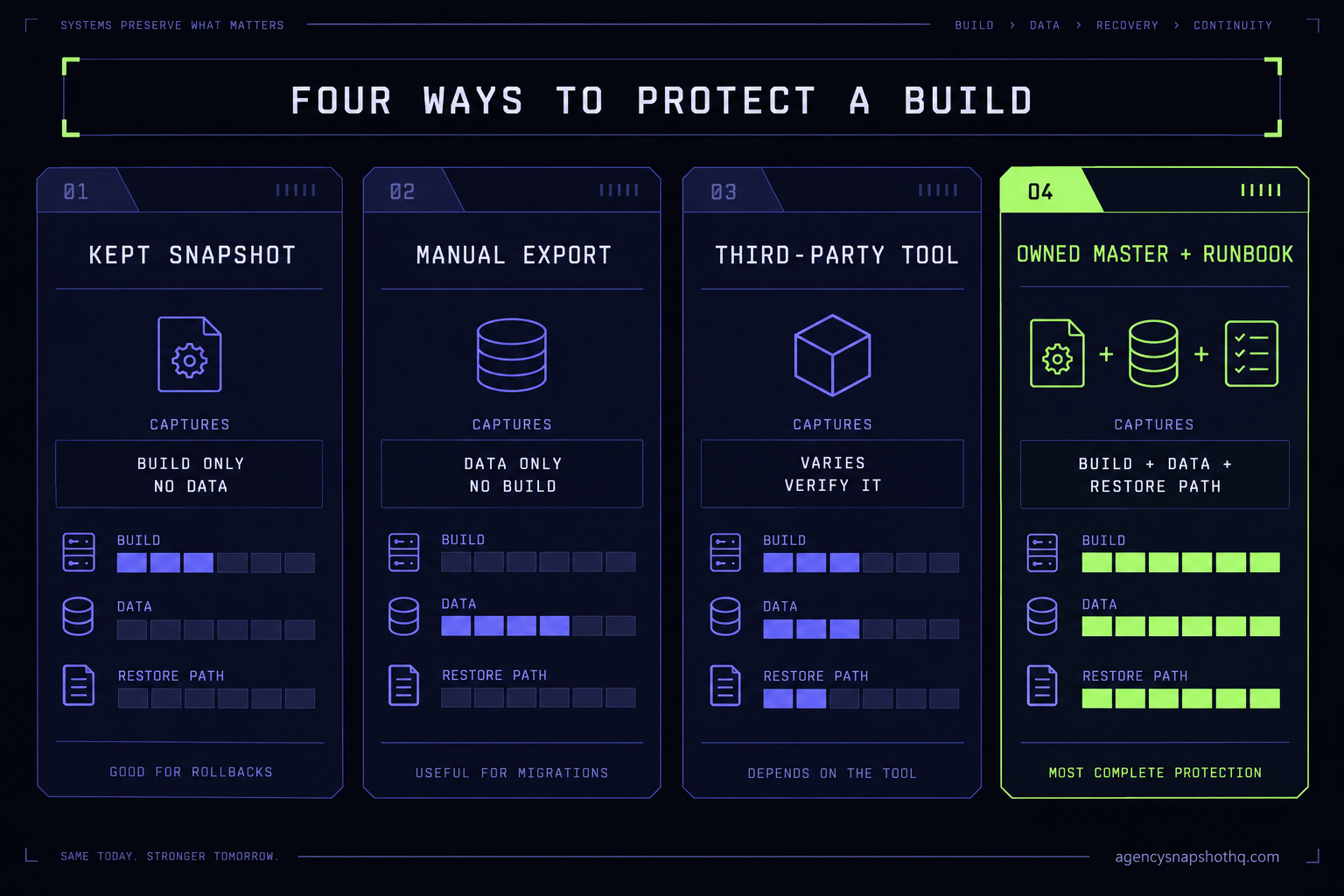
The table makes the real lesson plain. No single column is a complete backup. A kept snapshot and a data routine together cover most of it, and the owned-master method is just those two run with discipline and a written path out. The question is never really which one method to pick. It is which combination you will actually keep running, because a protection plan you abandon in week three protects nothing.
Where each method fails
Methods fail in predictable ways, and knowing the failure in advance is most of what stops it. Here are the four that catch agencies most often.
The restore that comes back empty
You did the responsible thing and kept a snapshot. The account breaks, you import the snapshot into a fresh sub-account, and it rebuilds beautifully: every workflow, every funnel, every pipeline. Then the client asks where their four thousand contacts went, and you remember, too late, that a snapshot carries none of them. What the reader sees is a perfect restore. What is actually wrong is that “backup” meant config only, and nobody paired it with a data export. The fix is to run both halves from the start, and to label your kept snapshots with what they do and do not contain so the person doing the restore at nine on a Tuesday is not surprised.
The restored workflow that never turns back on
A workflow got deleted, you found it in the ninety-day Deleted tab, and you restored it. Confirmations still are not sending. What the reader sees is a successful restore. What is actually wrong is the detail from the help article: a restored workflow returns as a draft and at the root level, not published and not in its old folder. It is sitting right there, off. The fix is a two-line step in your runbook: after any workflow restore, re-publish it and re-file it, then fire a test through it and confirm the message actually arrives.
The export that is six weeks old
You set up a manual export, took it once, felt protected, and moved on. Six weeks later you need it, and the file you have is from before the client ran their spring campaign, before half the current pipeline existed. What the reader sees is a backup. What is actually wrong is that a point-in-time export with no schedule is only ever as good as its date, and its date is always older than you think. The fix is either a real recurring routine with an owner and a calendar reminder, or a tool that takes the human memory out of it, because the one thing a backup cannot be is optional.
The account you never owned
The client churns. Relations were fine, or they were not, but either way they changed the password and the account went with them, and you are locked out of the build you spent three weeks on. What the reader sees is a lost client. What is actually wrong is that you never held a copy of the build anywhere you control, so when the sub-account left, the work left with it. The fix is the cheapest habit in this whole briefing: pull a snapshot of every client account into your own library the day it goes live, and refresh it when the build changes. The sub-account can walk out the door. The master build stays home. This is the same instinct behind rolling and tracking builds across every sub-account from one place rather than leaving each one stranded in its own account.
What a lost build actually costs
The reason to do any of this is that the downside is not abstract, and the arithmetic is not close. Work it with your own numbers; here are the assumptions laid out so you can swap them.
Start with the account you are protecting, and picture one worth protecting: a law firm build with years of matter history, or a digital marketing agency build carrying live client campaigns you could not reconstruct from memory. A client account runs on a HighLevel sub-account, and the agency carrying it is typically on the Unlimited plan at $297 a month or Agency Pro at $497 a month, with the plan tiers confirmed via search snippet across 2026 sources rather than a page I could fetch directly. That is the platform cost. It is not the build cost, and it is the build that you lose.
Now price the rebuild. Say the account’s build took you, honestly, somewhere around thirty hours the first time, across the workflows, the funnels, the pipelines, the website, the templates and the testing. Assume a loaded cost for your own time of $90 an hour. Rebuilding from nothing is thirty times ninety, which is $2,700 of your time, and that is before the parts that do not run on your clock at all: the A2P 10DLC brand sitting in review again, the sending domain waiting to re-authenticate, the days the client is live with nothing sending. If you hand the rebuild to a crew instead, a custom snapshot build on this site starts at $4,500, which is the market’s own answer to “what is a full build worth” and a fair ceiling on what you just lost.
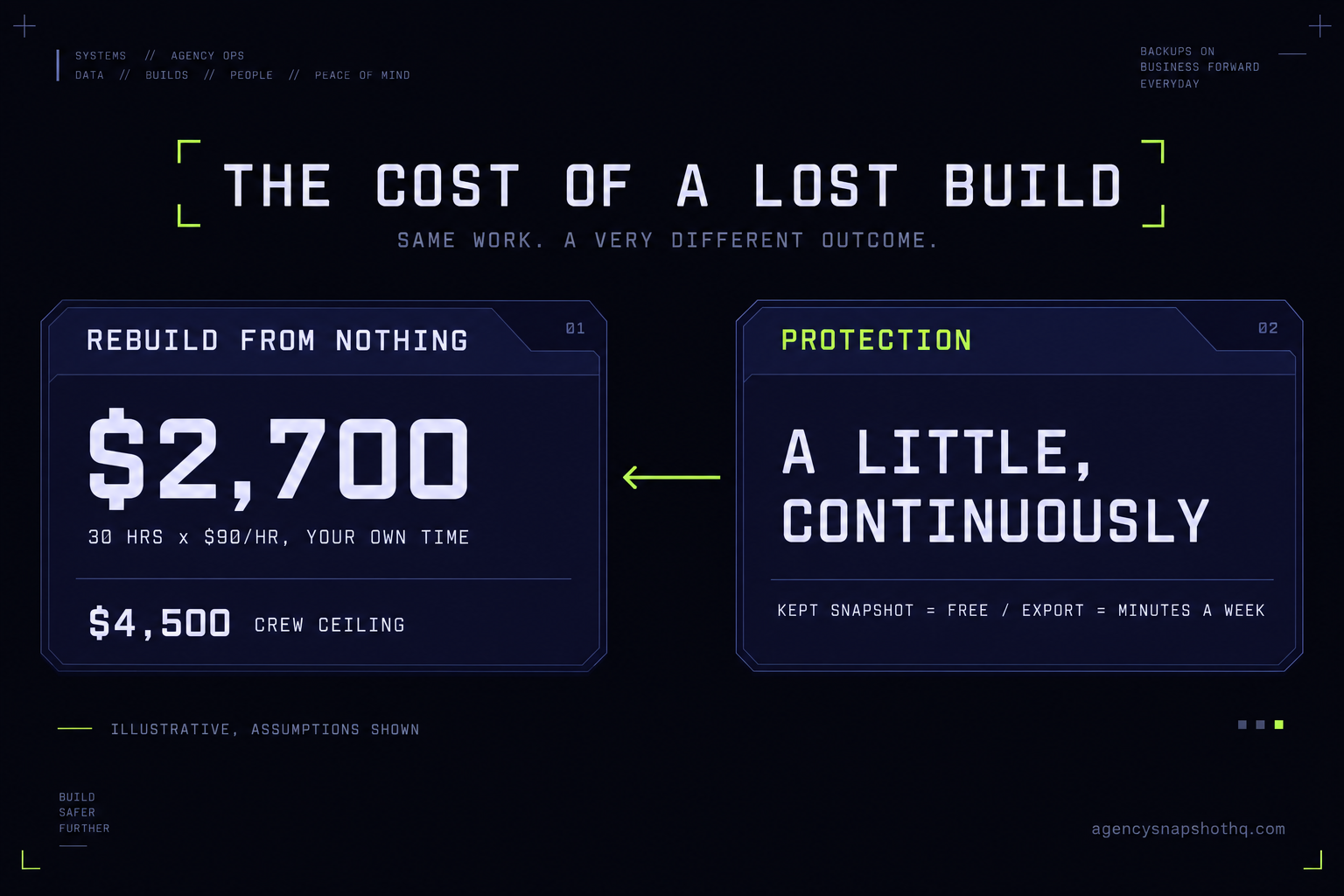
Set that against the cost of protecting it. A kept snapshot is free. A data export is your own time, and once it is a routine it is a handful of minutes a week; at $90 an hour, even half an hour a week across a year is well under the cost of a single rebuild. Running the whole thing yourself with discipline costs only the discipline. Handing the master-keeping to someone else, through the snapshot update service or a managed arrangement, is a known monthly number you can read off the pricing page and weigh against the $2,700-to-$4,500 hole that one bad Tuesday leaves.
The numbers only run one way. Protection costs a little, continuously. Recovery from nothing costs a lot, all at once, at the worst possible moment. The agency that spent the little recovers in an afternoon. The one that did not starts the account over and eats the gap while it does.
The objections worth taking seriously
A few reasonable pushbacks, answered in their strongest form, including the one that argues against paying us for any of it.
“Surely HighLevel is backing all this up on their end.” They run the infrastructure, and that is not the same as giving you a restore point. What you can actually reach as a user is the ninety-day workflow Deleted tab and a session-only builder undo, both documented above and both narrow. There is no self-service “restore my account to last Friday.” Assuming a backup you cannot reach and have never tested is how operators find out, during an outage, that it was never theirs to use.
“This is overkill for a three-account agency.” It is the opposite. A large shop has process and probably redundancy; a three-account operator is one churned client or one tired VA away from losing a third of the business in an afternoon, with no team to absorb it. The churned-client lockout in particular does not care how small you are, and the cheapest guard against it, pulling a snapshot into your own library, costs nothing but the habit. Small is the case for protection, not against it.
“Why would I pay you for this when I can pull my own snapshots?” You can, and if the account is config-heavy and light on irreplaceable data, you probably should, and this briefing just told you how for free. We are not selling a secret. What a managed arrangement or the update service actually buys is the part that is boring and therefore gets dropped: pulling the snapshot on schedule, keeping the data side current, and holding a tested restore runbook so recovery is an afternoon and not an improvisation. If you will genuinely keep that routine yourself, keep it and keep the money. If you have told yourself you will keep a routine three times and not kept it, that honest track record is the thing you are actually buying around. Decide on the track record, not the intention.
The build is the asset. The platform is rented, the client can leave, and the one thing that is unambiguously yours is a current copy of the machine, held somewhere you control, with a written way to put it back. Everything above is just four ways of making sure that copy exists before the Tuesday you need it.